Cuts only
what sticks out.
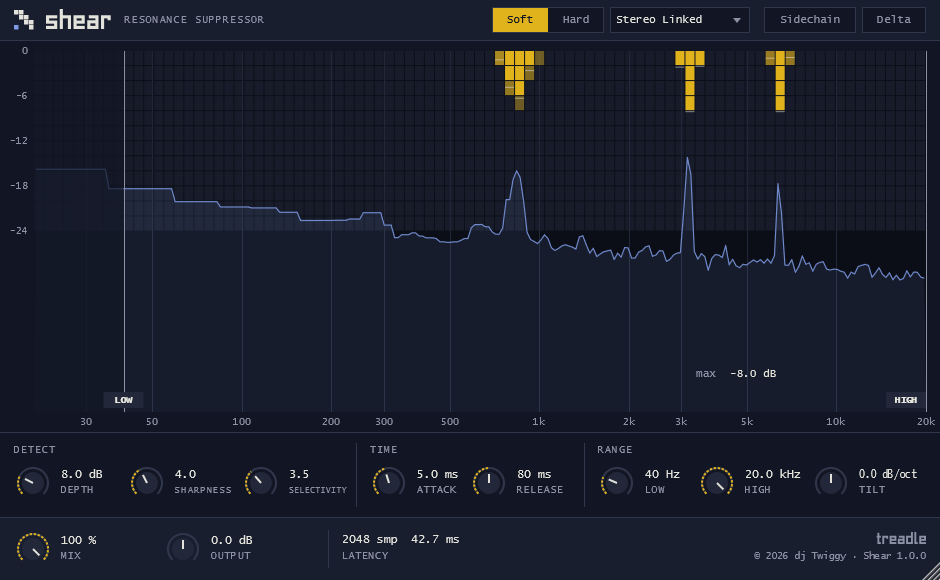
Shear listens to your track in real time, finds the resonances that stand above the rest of the spectrum and turns them down, only where they are and only while they last. Whistles, nasal tones, sibilance and boxiness go; the rest of the sound stays as it was.
Shearing, for sound
In cloth finishing, shearing trims the fibres that stand up from the surface so the fabric lies even. Shear does the same to the spectrum. It compares every frequency with its neighbours, and anything that rises above them is a candidate for a cut.
Find what sticks out
Selectivity sets how far a frequency must rise above its surroundings before Shear touches it. The harmonics of a note are compared on both sides, so a melody is not mistaken for a resonance.
Decide how to cut
Depth sets the maximum reduction, up to 30 dB. Sharpness goes from narrow, surgical cuts to broad, gentle ones. Tilt leans the work towards the highs or the lows.
Follow the sound
Attack and release set how fast each cut appears and lets go. Soft mode reacts smoothly; Hard mode is more decisive.
Hear what you remove
Delta plays only the part Shear takes away, so you can stop before it takes too much. Mix blends dry and processed sound with no phase shift between them.
Four common jobs
Harsh vocals
Tame a whistle in the upper mids or a nasal peak that moves with the singer, without an EQ notch that dulls every other word.
Sibilance
Set the range to the top octaves and Shear reduces the "s" sounds that poke out, leaving the air around them.
Boxy recordings
Small rooms and cheap microphones leave lumps in the low mids. Broad, soft cuts smooth them out.
Space for a voice
With sidechain on, Shear listens to the vocal and cuts a pad or guitar only where the voice is singing.
Before and after at matched level, plus the Delta signal, on a vocal, a drum bus and a full mix. The examples will be recorded from the release build.
Audio examples arrive with the release.
Short screen recordings with sound: finding a resonance, setting the range on the display, using Delta to check the cut.
Videos arrive with the release.
Everything on one screen
| Control | What it does |
|---|---|
| Depth | Maximum reduction applied to resonances, 0 to 30 dB. |
| Sharpness | Width of the cuts. High for narrow, surgical cuts; low for broad, soft corrections. |
| Selectivity | How far a frequency must stand out before it is touched. High means only the most obvious resonances. |
| Attack / Release | How fast a cut comes in and lets go. |
| Low / High | Frequency range Shear works on. Drag the handles on the display; double-click to reset. |
| Tilt | Positive values work more on the highs, negative values more on the lows. |
| Mix | Dry/wet balance, phase-aligned. |
| Output | Output gain. |
| Mode | Soft for a smooth, musical response; Hard for a firmer one. |
| Channels | Stereo Linked, Stereo Unlinked, Mid/Side, Mid only, Side only. |
| Sidechain | Detection follows the sidechain input instead of the track itself. |
| Delta | Plays only what is being removed. |
One licence, no subscription
Purchase opens when Shear is released. Until then nothing can be bought or downloaded from this page.
Shear
- Introductory price for the first weeks after release
- All 1.x updates free
- Full trial before you buy
Trial
- Every feature, for a limited period
- Your sessions still open when it ends
- Length to be confirmed at release
Formats and status
| Item | Detail | Status |
|---|---|---|
| macOS | AU, VST3, Standalone · Apple silicon and Intel | Builds in testing. Minimum macOS version to be set after testing. |
| Windows | VST3 · x64 | Builds in testing. |
| AAX (Pro Tools) | — | Not in the first release. |
| Latency | 2048 samples at 44.1/48 kHz, 4096 at 88.2/96 kHz, reported to the host for automatic compensation | By design. |
| Tested hosts | — | Will be listed here with the test date and version. |
Questions
Why does Shear add latency?
It analyses the sound in short overlapping windows to see the whole spectrum at once. Your DAW compensates automatically, so tracks stay in time. For live monitoring through the plugin the delay will be noticeable.
Is it an EQ or a compressor?
Somewhere between the two. Like an EQ it works on specific frequencies; like a compressor it acts only when the sound goes over a level. The difference is that the frequencies are not fixed: Shear finds them as the sound changes.
How do I avoid overdoing it?
Switch on Delta and raise Depth until you hear the harshness you want gone, and nothing more. Then switch Delta off.
Can I use it on a full mix?
Yes. Start with low Depth, high Selectivity and Soft mode, so only the most obvious resonances are touched.
Hear when Shear is out
One email at release, then at most one a month: new builds and new tools. No other mailings.